IT Automation with n8n: flows, integrations and practical workflows
Practical guide to self-hosted n8n: installation, user onboarding/offboarding workflows, automatic notifications, Microsoft 365 integration and infrastructure monitoring.
What is n8n and why use it
n8n (pronounced "n-eight-n") is an open-source, self-hostable workflow automation platform. An alternative to Zapier and Make, but with no execution limits and full control of data.
Advantages over cloud alternatives
| Feature | n8n self-hosted | Zapier | Make | |---------|----------------|--------|------| | Monthly cost | ~0€ (hosting only) | 49-69€ | 9-29€ | | Executions/month | Unlimited | 2,000-50,000 | 10,000-40,000 | | Data on your infrastructure | ✅ | ❌ | ❌ | | Custom code (JS/Python) | ✅ | Limited | Limited | | Private/internal API | ✅ | Difficult | Difficult |
Installation with Docker
version: '3.8'
services:
  n8n:
    image: n8nio/n8n:latest
    restart: always
    ports:
      - "5678:5678"
    environment:
      - N8N_BASIC_AUTH_ACTIVE=true
      - N8N_BASIC_AUTH_USER=admin
      - N8N_BASIC_AUTH_PASSWORD=cambiami
      - N8N_HOST=n8n.tuodominio.com
      - N8N_PORT=5678
      - N8N_PROTOCOL=https
      - WEBHOOK_URL=https://n8n.tuodominio.com/
      - GENERIC_TIMEZONE=Europe/Rome
    volumes:
      - n8n_data:/home/node/.n8n

volumes:
  n8n_data:
docker-compose up -d
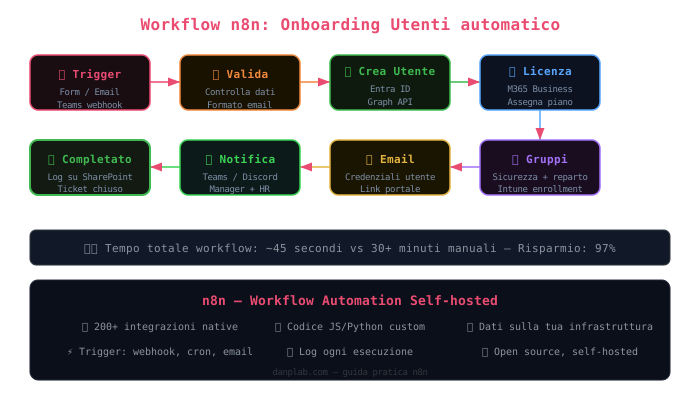 Automatic onboarding flow in n8n: from trigger (form/email) to user creation in Entra ID, license assignment and Teams notification. Total time: ~45 seconds.
Workflow 1: Automatic user onboarding
This workflow automatically creates a new user in Active Directory / Entra ID when a request arrives via form or email.
Trigger (Form/Email/Teams)
    ↓
Data validation
    ↓
Create user in Entra ID (Microsoft Graph API)
    ↓
Assign M365 licenses
    ↓
Create Exchange mailbox
    ↓
Add to security groups
    ↓
Send credentials via secure email
    ↓
Notification on Teams/Discord
Microsoft Graph API Configuration
First of all, register an app in Entra ID:
Entra ID → App registrations → New registration
→ API permissions → Microsoft Graph:
  - User.ReadWrite.All
  - Group.ReadWrite.All
  - Directory.ReadWrite.All
→ Grant admin consent
HTTP Request node to create user
{
  "method": "POST",
  "url": "https://graph.microsoft.com/v1.0/users",
  "headers": {
    "Authorization": "Bearer {{ $node['Get Token'].json.access_token }}",
    "Content-Type": "application/json"
  },
  "body": {
    "displayName": "{{ $json.nome }} {{ $json.cognome }}",
    "userPrincipalName": "{{ $json.username }}@tuazienda.com",
    "mailNickname": "{{ $json.username }}",
    "accountEnabled": true,
    "passwordProfile": {
      "forceChangePasswordNextSignIn": true,
      "password": "{{ $node['Genera Password'].json.password }}"
    },
    "department": "{{ $json.reparto }}",
    "jobTitle": "{{ $json.ruolo }}"
  }
}
Workflow 2: Infrastructure monitoring with alerts
Cron (every 5 min)
    ↓
HTTP Request → check services (Proxmox, NAS, n8n, etc.)
    ↓
IF → service down?
    ↓ Yes
Add to downtime list
    ↓
Discord/Telegram notification
    ↓
Open automatic ticket
Service check script
// "Code" node in n8n
const services = [
  { name: 'Proxmox', url: 'https://proxmox.interno:8006' },
  { name: 'NAS', url: 'http://nas.interno:5000' },
  { name: 'n8n', url: 'http://localhost:5678/healthz' },
];

const results = [];
for (const svc of services) {
  try {
    const resp = await $http.get(svc.url, { timeout: 5000 });
    results.push({ ...svc, status: 'UP', code: resp.status });
  } catch (e) {
    results.push({ ...svc, status: 'DOWN', error: e.message });
  }
}

return results.map(r => ({ json: r }));
Workflow 3: Automatic offboarding
Trigger (termination date from HR)
    ↓
Disable AD/Entra ID account
    ↓
Revoke active sessions (Graph API)
    ↓
Block conditional access
    ↓
Backup email → SharePoint
    ↓
Remove from all groups
    ↓
Unassign licenses
    ↓
Schedule account deletion (30 days)
    ↓
Final report to HR + manager
Useful integrations for SysAdmin
Microsoft Teams
// Teams webhook for notifications
{
  "@type": "MessageCard",
  "@context": "http://schema.org/extensions",
  "summary": "Alert infrastruttura",
  "themeColor": "FF0000",
  "title": "🚨 {{ $json.service }} è DOWN",
  "text": "Rilevato alle {{ $now.format('HH:mm') }}"
}
Discord notification
// Discord node in n8n
{
  "content": "",
  "embeds": [{
    "title": "🔴 Alert: {{ $json.service }}",
    "description": "Il servizio è irraggiungibile",
    "color": 15158332,
    "timestamp": "{{ $now.toISO() }}",
    "fields": [
      { "name": "Server", "value": "{{ $json.host }}", "inline": true },
      { "name": "Errore", "value": "{{ $json.error }}", "inline": true }
    ]
  }]
}
Best Practices
- ✅ Use n8n credentials for API keys (do not hardcode them in workflows)
- ✅ Enable logging of every execution — essential for debugging
- ✅ Timeouts on HTTP nodes — prevents stuck workflows
- ✅ Error handling — always an "On Error" node in critical workflows
- ✅ Regular backup of the
/home/node/.n8nfolder - ❌ Do not expose n8n to the internet without authentication — use Cloudflare Access